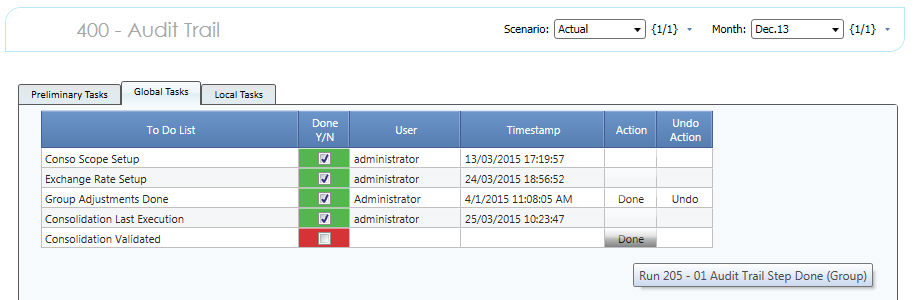
Once the Consolidation Procedure works positively on a combination of Scenario and Period, this Scenario and Period can be Validated, and eventually Archived.
The Validation Action
Open the BFC Process Manager Capsule, Audit Trail Manager Screen. Choose a combination of Scenario and Period
Click on the "Done" Button. Validation is Done. The last user who executed the action is tracked as the execution date.

Once validated you CAN'T run the Consolidation Process on that Scenario/Period again.
> What have I to do if I have to run the Consolidation Process on that Scenario/Period again with additional data?
- reset the Validation clicking on the button block "Undo" (Red Arrow Icon) on the row "Consolidation Validated"
> Attention the Validation Action doesn't Close the Scenario neither has any effect like Cell Locking or Scenario Select restriction. It only reports someone checked and validated the Consolidation Figures. To implement such logics please refer to Screen Edit Guidelines
The Archiving Action
Open the BFC Process Manager Capsule, Scenario Manager Screen. Choose a combination of Scenario and Period
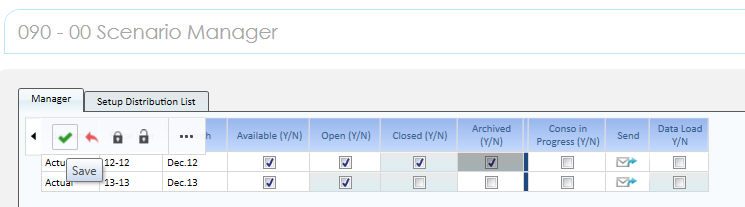
Tick the Archived Y/N Check-box and then Save. A notification can be triggered clicking on the "Send" Icon. Additonal information can be found at Set Up and Open Scenario. The last user who executed the action is tracked as the execution date only if the "Send" Action is executed.
Once archived (but even Closed) you CAN'T run the Consolidation Process on that Scenario/Period again.
> What have I to do if I have to run the Consolidation Process on that Scenario/Period again with additional data?
- reset the Scenario Status to Open.
> Attention the Validation Action can be performed only if the Scenario has been already Closed. It has no effect on Cell Locking but the Archived Scenario will not be available any more in the entire application (both Data Collection or Data Reporting Screens). The scope of archiving a Scenario/Period is not clear the drop down lists that prompts the available Scenarios/Periods from the old ones once they are useless.
We remind that the Scenario in Closed Status removes such Scenario from Data Collection Screens but not from Data Reporting Screens.
 Archiving
re-calculates the cubes "F (Closed - Archived) Periods x Scenario"
. This provides the select based on, triggered as the Reporting Screens
are opened.
Archiving
re-calculates the cubes "F (Closed - Archived) Periods x Scenario"
. This provides the select based on, triggered as the Reporting Screens
are opened.