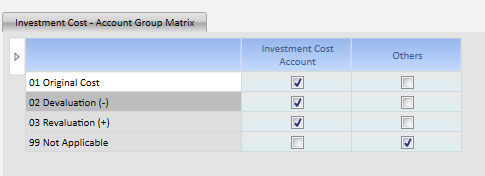
Investment Cost Group Account Attributes
For each Investment Cost check the corresponding Account Group you want the Investment Cost to be related with.
Sample : opening the Investment in subsidiaries Account screen, data entry is allowed on a subset of movements and investment cost items. The available investment costs are automatically pre-selected thanks to the relationship you define checking the column block Investment Cost Account.
The Investment in Subsidiaries Accounts must have been related to the Investment Cost Account Group Item during the Grouping and Categories Step.
The Tab allows the Insertion of new items but only the pre-defined items are already included in the Consolidation logics. Please refer to Investment Elimination Step.
All the new item must be related with the Investment Cost Account Group unless different needs.
 When
completed click on the Confirm Button. A process is executed to spread
the attributes from Investment Cost Account Group Level at Account Level.
When
completed click on the Confirm Button. A process is executed to spread
the attributes from Investment Cost Account Group Level at Account Level.