As you know the Application is able to calculate some automatic adjustment (elimination) during the consolidation process.
An elimination basically consists of two different steps :
> the elimination of the Actual TBs : on the same account, the account amount is written with opposite sign (in a different layer of course)
> the balance of the elimination : the same account (with opposite sign) is written in one or more plug accounts
Which are the setting to support such process ?
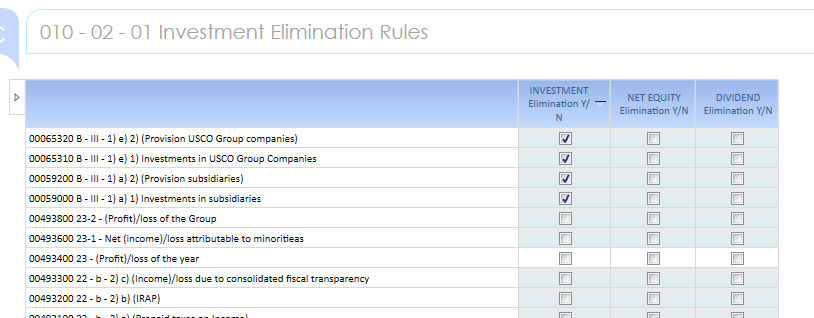
> The accounts that must be "eliminated" upon Investment elimination rules should be flagged in the current Screen
Only the Leaf Accounts can be ticked
Press Save when Done.
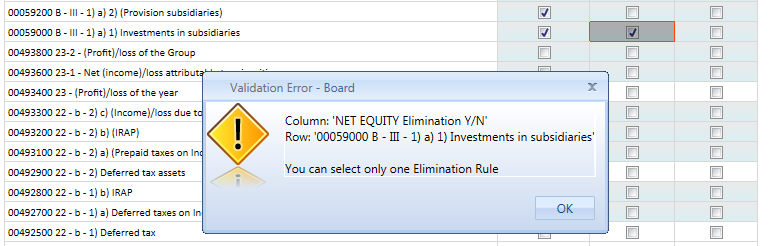
Only one Elimination Rule can be given per Account. The Rule are mutually exclusive. When trying to setup multiple rule the following message is prompted out :
INVESTMENT Elimination
The Flagged Accounts are "Eliminated" in the Layer 10-02 INVESTMENT Elimination and the Amount is plugged on the Consolidation and Conversion Reserve Plug Accounts that is linked to the related Tech Account for Select :
070/071 Group/Minority Conversion Reserve
080/071 Group/Minority Consolidation Reserve
Please refer to the L10-02: INVESTMENT ELIMINATIONS for full description of the process
NET EQUITY Elimination
The Flagged Accounts are "Eliminated" in the Layer 10-03 NET EQUITY Elimination and the Amount is plugged on the Consolidation and Conversion Reserve Plug Accounts that is linked to the related Tech Account for Select :
130/131 Group/Minority Retained Earnings
080/071 Group/Minority Consolidation Reserve
Please refer to the L10-03: NET EQUITY ELIMINATIONS for full description of the process
DIVIDEND Elimination
The Flagged Accounts are "Eliminated" in the Layer 10-03 NET EQUITY Elimination and the Amount is plugged on the Consolidation and Conversion Reserve Plug Accounts that is linked to the related Tech Account for Select :
130/131 Group/Minority Retained Earnings
080/071 Group/Minority Consolidation Reserve
Please refer to the L10-05: DIVIDENDS ELIMINATIONS for full description of the process
Attention ! The Elimination of the Subsidiaries Profit is automatically done but doesn't require any settings since the Accounts are recognized through the Tech Account for Selection relationship, item 010 - Profit for the Period (Company Level).