Historical Rate Accounts
Some accounts must be translated at Historical Rate, that is the exact exchange rate when the transaction or movement happened.
Such accounts can be filtered using the Exchange Rate attribute (HIS) ; please refer to Account Settings.
> You must Select Period, Scenario and Consolidation Node Currency.
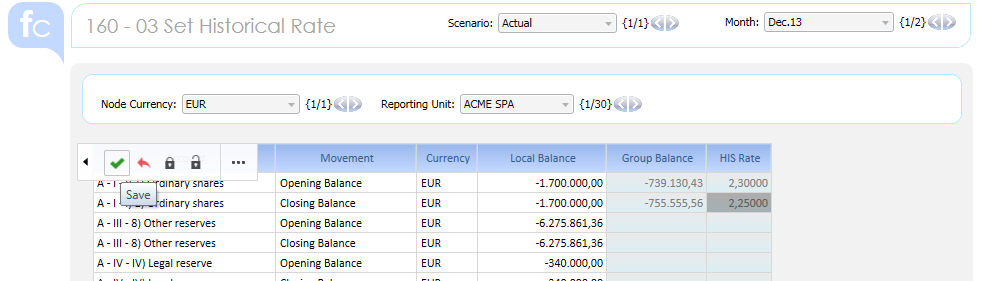
> Then Reporting Unit by Reporting Unit you can proceed with data entry :
- by row all the Accounts (that have been setup as HIS Rate Account) are reported by Movement . Only combination of Account and Movement that do have TBs different than zero are visualized.
- RU Currency is reported
- Local Balance in Local Currency is reported
- enter HIS Rate or Translated Value then click save when done
 User
should indicate if data entry happen on the exchange rate, or on the converted
value, so that one of the two block can be hidden.
User
should indicate if data entry happen on the exchange rate, or on the converted
value, so that one of the two block can be hidden.
Data entry on historical rate account is available on Layer 01 (Local Currency) only; it is not possible to Post an Adjustment using historical rates logics.
 The
data entry cube is not the Conso Value but the "Conso Value (L1 at
Group Currency for HIS Rate Accounts)" cube. The translation procedure
uses this cube as data source to translate historical accounts of the
Conso value cube during the Consolidation procedure.
The
data entry cube is not the Conso Value but the "Conso Value (L1 at
Group Currency for HIS Rate Accounts)" cube. The translation procedure
uses this cube as data source to translate historical accounts of the
Conso value cube during the Consolidation procedure.
 Attention
: if you missed some rates the effect is :
Attention
: if you missed some rates the effect is :
> if the General Settings "Translate HIS Account at AVG Rate" is Yes such Accounts are translated at Average rate
> if the General Settings "Translate HIS Account at AVG Rate" is No such Accounts are NOT translated at all (zero)