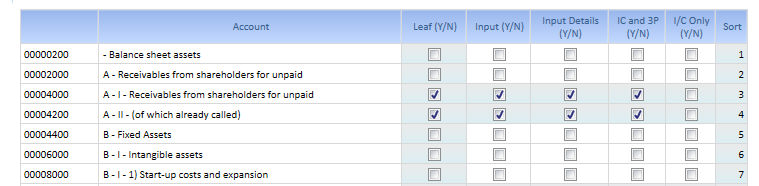
Once you have loaded in the Application your Group Chart of Account some basic attributes must be given.
> Leaf Y/N
If checked the Account is treated as a leaf, it means that is value is not calculated as a sum of leaf accounts but must be loaded or can be input manually.
> Input Y/N
If checked data entry on this account is allowed. It can be enabled only on those Accounts that have been previously flagged as "Leaf" Yes
> Input details
If checked this account requires additional details during data entry : typically Movement and Movement Detail.
> IC and 3P
If checked this account is available both as IC Account (which requires a counterpart different from 3P) and as not IC Account (which counterpart could be 3P or anything else)
> I/C Only
If checked this account is available for Intercompany Data Entry forms only; it means that the counter part can't be "Third Party"
I/C Only and IC and 3P are mutually exclusive
> Exclude I/C Recon Y/N
If Flagged Y, even if this Account is IC Account it must not be included in the IC Reconciliation calculation.
> Sort
It is optional and can be used to created sorted reports that can using the code or the description of the accounts as sorting criteria
Attention ! I/C Only and IC and 3P are mutually exclusive. If both are selected the Account is red highlighted.
 In the
layout there is an additional hidden block (cube) the Switch Sign attribute.
It can be used to revert the sign of the Account TB in data Entry or for
reporting purposes.
In the
layout there is an additional hidden block (cube) the Switch Sign attribute.
It can be used to revert the sign of the Account TB in data Entry or for
reporting purposes.
It is not active by default. The TB should be provided with the proper sign.
When completed Click the "Confirm" Button.