Manage an Adjustment
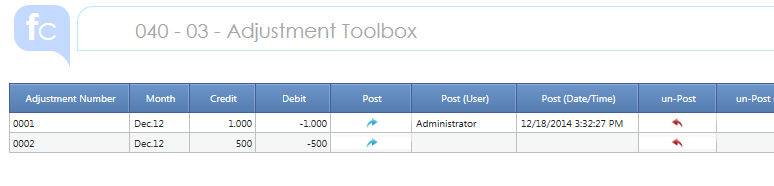
Open the Screen 040 - 03 Adjustment Toolbox to perform different actions on any Adjustment.
The Report recaps all the Adjustment listing them by Number and Period created since ever.
 If you need to restrict the Adjustment to the open period
only, focus the Time Selection using the F (Open-Closed) Periods per Scenario.
If you need to restrict the Adjustment to the open period
only, focus the Time Selection using the F (Open-Closed) Periods per Scenario.
POST an Adjustment
Click on the "Post" Button (blue arrow) on the Adjustment Row you want to Post. A confirmation message is prompted at the conclusion of the action. The User and Action Timestamp is tracked.
You can Post the same Adjustment several times. Any time the "old" Adjustment will be replaced.
 Attention ! when you post an Adjustment all the Adjustments
belonging to the same Scenario and Month and Consolidation Node and Layer
that have already been posted are posted again.
Attention ! when you post an Adjustment all the Adjustments
belonging to the same Scenario and Month and Consolidation Node and Layer
that have already been posted are posted again.
un-POST an Adjustment
Click on the "un-Post" Button (red arrow) on the Adjustment Row you want to un-Post. A confirmation message is prompted at the conclusion of the action. The User and Action Timestamp is tracked.
You can un-Post the same Adjustment several times.
Attention the Adjustment Heading and Rows are not deleted. To re-post it you must first Click on the Confirm Button of the Adjustment Rows Edit Screen.
REVERSE an Adjustment
Click on the "Reverse" Button (back circular arrow) on the Adjustment Row you want to Reverse. A confirmation message is prompted at the conclusion of the action.
Reverse Rule : the Amount sign is switched and posted from Credit to Debit and vice-versa.
You can Reverse the same Adjustment several times. Reversing twice means no Reversing.
To take Action the "reversed" Adjustment must now be Posted.
FORWARD an Adjustment
Click on the "Forward" Button (forth circular arrow) on the Adjustment Row you want to Forward. You will be asked to choose the Periods (month) where the Adjustment must be forwarded. During the Forward the same Adjustment Number will be kept.
You can select multiple periods. A confirmation message is prompted at the conclusion of the action.
You can Forward the same Adjustment several times.
CLOSE on Next FY (Y/N)
Tick this Check-box if the Adjustment must be closed in the Next Fiscal Year.
Closing Rules :
> the Movement Total Amount will be reversed (see above) on the ADE Movement
> if the Adjustment impacts the P&L the P&L Amount will be reversed and rebalanced on the Retained Earning Plug Account
Attention ! to take effect
1 the CLOSING Adjustment on CFY must be executed at the re-Opening of the FY
2 the Adjustment must now be Posted again in the Next FY.
For a better understanding of the Action effect please have a look at the Adjustment Editor Introduction
If you need to track also the Forward and Reverse Action
please apply the same Logics of the Post Track procedure (040 - 03 Post
Adjustment Step 1 and Step 2).
Adjustment JOURNAL
The Adjustment Journal Screen provides a simple template you can re-use to tailor an Adjustment Summary Report upon the business request.