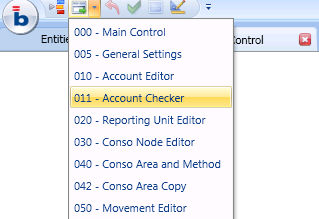
Even if no particular notation rule is recommended we would suggest to adopt the same criteria creating new screens or database objects as it has been done in the standard model. This helps communication among users and developers, and speed up object localization within the Application.
Screen Notation
Each screen name is composed as following : nnn - screen description (e.g. 010 - Account Editor).
It's a common practise to keep gaps between screen counters . Any intermediate screen cab be added and easily sorted.
The screen counter normally reflects the order in which the screens are normally scrolled and gives a first impression of the flow of the Capsule tasks.
Procedure Notation
Each procedure name is composed as following : nnn - procedure description (e.g. 010 - Preliminary Account ).
The counter is the same as the screen's where the procedure is mostly executed.
If multiple procedure should be executed within the same screen the notation is the following :
010-01 Procedure "A"
010-02 Procedure "B"
indicating which is the privileged execution order.
Infocubes Notation
Infocubes are normally grouped accordingly to functional criteria . "Account Settings" infocubes family groups all those infocubes hosting the Account attributes, "Translation rates" infocubes family groups all cubes involved in the Currency Translation process etc etc
Often a single digit prefix indicates the Infocube scope : "F" for a Flag infocube (a boolean Infocube that usually indicates an Account attribute), "S" for a Setting infocube (a batch calculated infocbube that discriminates different process behaviors during procedure execution), "W" for a pure working Infocube (an Infocube without any particular functional meaning).
Icons
Different icons indicate the nature of the topic
 Warning : describes actions with relevant effects on the Application.
Be cautious.
Warning : describes actions with relevant effects on the Application.
Be cautious.
 Tips : suggestions that can be easily done
 Functional focus : a description of the business logics behind the Application
 Tech focus : a description of the tech logics (data flow) behind the Application