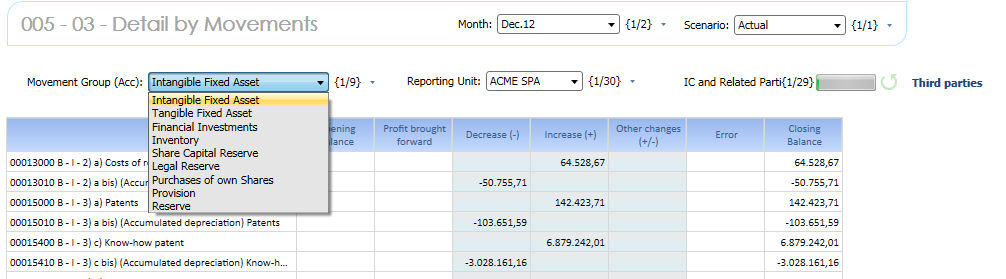
Some Balance Sheet Accounts (not Short Terms) require details across the Movement dimension : it is then mandatory to provide the details of the movement occurred during the fiscal year between the opening balance and the closing balance of the account.
Select the Scenario, Period and Reporting Unit. If Profiles have been set up by Reporting Unit this last step is not necessary. You can restrict the Accounts list choosing like Movement Group (Account) , "Intangible Fixed Asset" item and finally choose one counterpart.
You can know enter your data. Click Save when done.
Warnings !
As you can see some cells are blocked. This depends from a combination of different logics : data entry is admitted on
- Accounts which attribute Input Value is Y
- Any Counterpart different from the RU
- Any Counterpart and/or TP depending on the Account IC Strictly and IC Strictly and Other attribute
- Movement is Calculated N and is different from Closing Movement. Here you can't edit the Closing movement. Go back to the Closing Balances data Entry Form if needed.
- Movement is available per that specific Account
Please refer to the System configuration section for details.

 Screen Selection : by default the Data are saved on
:
Screen Selection : by default the Data are saved on
:
| Movement | by Column (*) |
| Layer | 01 - Local Input |
| Investment Cost | Not Available |
| Custom 1 | Not Available |
| Custom 2 | Not Available |
| Consolidation Node | 99 Default |
| Scenario | on Pager select based on (Open - Closed Period) |
| Month | on Pager select based on (Open - Closed Period) |
| Reporting Unit | on Pager |
| Intercompany | on Pager |
| Account | by Row |
(*) The List of the Available Movement is dynamically (Pager Trigger Procedure) created when a Movement Group (Account) item is chosen.
> the list excludes the calculated Movements which are not necessary in the current screen
> the list include the Movements which are Flagged per the chosen Movement Group (Account) accordingly with the Movement Settings Matrix
In the Error Movement block a red backgorund indicates if there is a non zero value on the Error (ERR) flow for that specific account.
The error flow is not a data entry flow but it is always re-calculated as any data entry occurred as the different between the (Opening) plus all (Movements) and the (Closing), that is error is not null is (OPE)+(MOVs)-(CLO) <> 0.