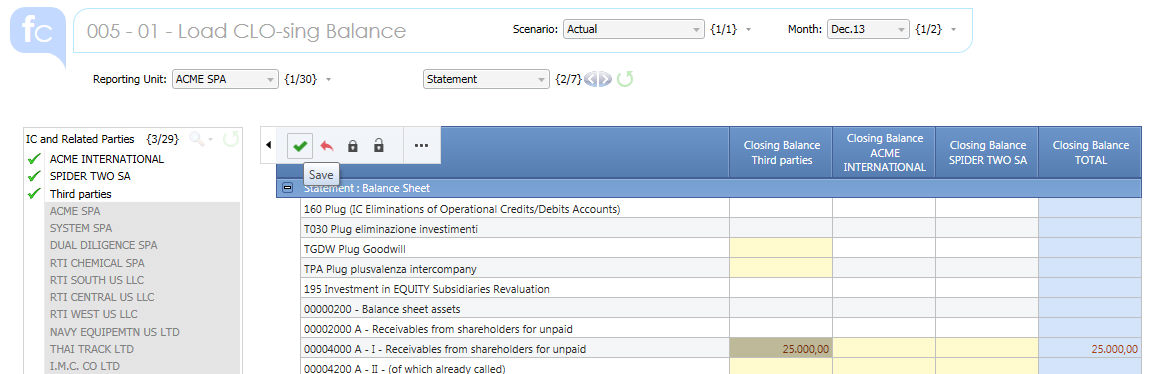
This Screen provides the capability to entirely manually input the Profit and Loss and the Balance Sheet balances of your Reporting Units.
Select the Scenario, Period and Reporting Unit. If Profiles have been set up by Reporting Unit this last step is not necessary. You can restrict the Accounts list choosing like Statement, "Balance Sheet" item or "Profit and Loss" and finally choose one or multiple counterparts.
You can know enter your data. Click Save when done.
Warnings !
As you can see some cells are blocked. This depends from a combination of different logics : data entry is admitted on
- Accounts which attribute Input Value is Y
- Any Counterpart different from the RU
- Any Counterpart and/or TP depending on the Account IC Strictly and IC Strictly and Other attribute.
Please refer to the System configuration section for details.

 Screen Selection : by default the Data are saved on
:
Screen Selection : by default the Data are saved on
:
| Movement | Closing |
| Layer | 01 - Local Input |
| Investment Cost | Not Available |
| Custom 1 | Not Available |
| Custom 2 | Not Available |
| Consolidation Node | 99 Default |
| Scenario | on Pager select based on (Open - Closed Period) |
| Month | on Pager select based on (Open - Closed Period) |
| Reporting Unit | on Pager |
| Intercompany | by Column |
| Account | by Row |