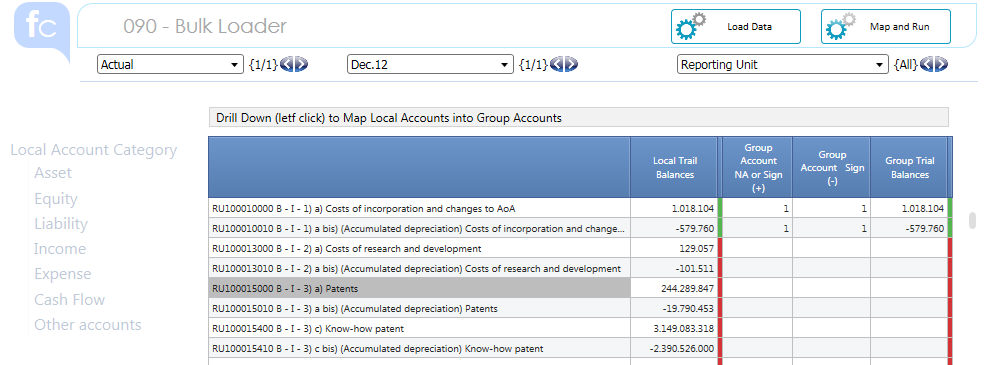
The Bulk Loader provides the Capability to import TBs Data using the Local RU Chart of Accounts, map them accordingly the Group Chart of Account and ignite them in the Consolidation Process .
STEP 1 - Loading Data
The Load Data Action is basically a Data Loading Procedure based on a set of predefined Data Reader Protocols and related ASCII files that can be used to load the Bulk Loader Settings and Measure Types
The following pre-Package data-readers are provided :
| Data Reader Name | Asci File Name | Ascii File Track (TAB separator) | Comment |
| conso_value_data_load | V2180001.csv | Code0000100000D052Local Account Code0000200000D013Reporting Unit Code0000300000D016Consolidation Node Code0000400000D018IC and Related Parties Code0000500000D030Investment Cost Code0000600000D031Custom 1 Code0000700000D034Movement Code0000800000D039Custom 2 Code0000900000D036Scenario Code0001000000D035Layer Date0001100000A001Month 0001200000V218Local Trail Balances |
RU
Trial Balances :
> all the dimension codes must be consistent with previous coding Attention : > Consolidation Node code must be '99' > if IC code is not available it is by default '3P' > if investment cost code is not available it is by default '_' > if Custom 1 code is not available it is by default '_' > if Custom 2 code is not available it is by default '_' > Scenario code must be 'ACT' (for Actuals, any for others) > if movement code is not available it is by default 'CLO' : Closing Movement must be anyway provided > Layer code must be 'L01' > Month codes must be provided in yyyymm format > TBs must be provided - in numeric double precision format - with proper sign (Negative for Credit, Positive for Debit) - P&L Profit must NOT be provided |
| local_account_map_(+) | V2190001.csv | Code0000100000D052Local Account Code0000200000D022Account 0000300000V219Local Account Map (+) |
>
Local Account CoA codes
> Group Account CoA codes > boolean counter that maps 1 to 1 Local Account to Group Account |
| local_account_map_(-) | V2200001.csv | Code0000100000D052Local Account Code0000200000D022Account 0000300000V220Local Account Map (-) |
>
Local Account CoA codes
> Group Account CoA codes > boolean counter that maps 1 to 1 Local Account to Group Account |
| local_account_counter | V2210001.csv | Code0000100000D052Local Account Code0000200000D013Reporting Unit 0000300000V221Local Account Counter |
>
Local Account CoA codes
> Reporting Unit codes > boolean counter that flag Accounts belonging to each RU (Filter) |
STEP 2 - Map and Run
Such Action maps the Local Coa TBs into the Group CoA TBs using the Matrixes that have been populated with the proper connections among Accounts. Such Matrixes can be loaded as per previous step, or manually edited.
To manually edit them , select the Reporting Unit and Left Click (Drill Down) on the Local Account : then flag the check-box in the correct Matrix.
the process allow to choose a different Group Account, depending from the Local TB sign.
> Account which sign is not influent for the Group Account association : use the "Group Account NA" Column
> Account which sign is influent for the Group Account association :
- use the "Group Account Sign(+)" Column to choose the Group Account in case of positive TB
- use the "Group Account Sign(-)" Column to choose the Group Account in case of negative TB
Different Alerts are provided to :
> avoid to map 1 Local Account to n Group Account : this is admitted but only for Sign Management (different Columns)
> check that after the process the TB before and after the mapping are equal
 The Destination
Cube "Local Trial Balances (re-Mapped)" has both dimensions
: Local and Group Accounts.
The Destination
Cube "Local Trial Balances (re-Mapped)" has both dimensions
: Local and Group Accounts.
In the Procedure the Data can be mapped (by default)
on Default Consolidation Node (99) and Layer Local input (L01) .
This prevents the process to replace Layers or Consolidation Nodes by mistake.
STEP 3 - DATA Flow in FC Process
This Step provides an intermediate Layer between the Data loading and the Consolidation Process. By default the Process is available for the Data Loaded with the Bulk loader Step (the Batch Data Loading loads the TBs directly into the Conso Value Cube) but it can be easily adapted for any "source" cube.
Using the Pager is possible to "copy" into the Consolidation Process only a portion of the data selecting some Periods or some Reporting Units only.
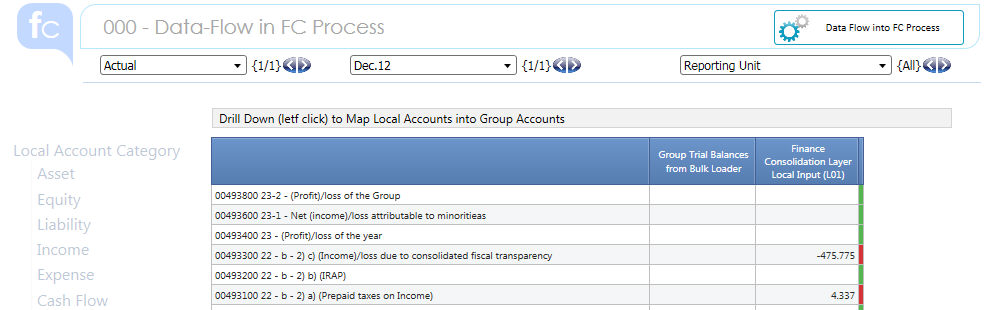
Once completed your selection click on the "Data Flow into ..." Button.
An alert checks that the copy action worked properly.
In the Procedure the data - flow which ignite the re-Mapped
Trial Balances into the FC Process use selections on Selected Items.
This prevents the data-flow to delete manual data entry or adjustment that have been posted on that Scenario and Period.
For the Selection Logics and how these twist the Procedure behavior please have a look at Logics of the Flow of Data
Change the Selection if this doesn't fit your scenario.